Categories
Technology

How does esign mark the end of the paper era

It’s not really surprising or new to know that businesses mostly have run on paper. Paperwork has always been the lifeblood of businesses. A majority of the businesses are trying to cut back on the use of paper and shifting to an electronic office system. Google research reveals that an office worker uses an average of 10,000 sheets of paper every year which results in a waste of $8 billion paper annually. However, to stay competitive in the market, it’s high time that businesses should close the doors on the paper era. It is important to change with the time but the key to enhancing efficiency in a business is to adopt productive technology like eSign digital signature.

Cutting unnecessary costs involved in the paper documentation in businesses, eSign digital signature. hosts a lot of benefits improving data security and giving the customer peace of mind. Below-listed is the reasons why eSign marks the end of the paper era:

Simple and efficient process: With the introduction of esign, it has become easy to access documents, customize it our way, and get them eSigned without having to put any effort. Also, eSign services help to save time as there is no task of tracking down a document from a stack of files piled on your desk. Sending an electronically generated file/invoice to a client to eSign makes the process faster and smoother.

Cut unnecessary costs: : The costs to maintain a paper-based workplace have higher chances to cause inefficiency in the work. Apart from printing reams of paper, there are other costs involved for the usage of pen, ink, and toners that are unnecessary and can be replaced with the eSign digital signature. that is time and money efficient. So, instead of wasting money on printing the paper documentation, eSignature can be used.

Easy to share and track: It gets troublesome to dig through files to find the right document and get it signed. If the concerned person is not present in the workplace, the whole process becomes slow. With the eSign services, it is easier to share files digitally and track the status via follow-ups on email. Through the electronic system, nobody has to wait to get the documents signed and the process becomes swift and hassle-free.

Improves security: : Sometimes important files are misplaced or lost during business meetings, and employees mistakenly leave their important documents on communal printers but eSign digital signatures secure it all. There is no risk of document loss because protected data software is used to avoid any error. Documents remain confidential when shared digitally with high-security software used in the systems.

Boost Customer Confidence: The paper documentation is tough to manage and gets misplaced oftentimes which may lead to misuse of data. The eSign services increase data security and give customer satisfaction and peace of mind knowing that their data is safe and secure with trusted software. When the data is easily accessible with no risk of loss or misplacement, it boosts the confidence of customers and promotes eSignature.To sum up, the above-mentioned are some of the reasons businesses have moved beyond the use of pen and paper and shifted to eSign digital signature. With this effective change in the industry, the productivity of businesses is anticipated to increase.

Categories
Technology

About Digital Signature Certificate For ITR Filing

Read Out The Things You Should Know About Digital Signature Certificate For ITR Filing

Advancement in technology has made the entire procedure of filing of tax and submission of returns over the internet quite easier. To e-file income tax returns, taxpayers are supposed to affix their digital signature onto their document of tax return as a medium of authentication. Altering documents that are digitally signed and to claim fraud over digital signatures is not possible. Not only digitally signed documents are protected from any modifications but also from any sort of additions in the already existing document.

Before moving ahead to understand digital signature’s participation in ITR filing, let us first understand how to apply for digital signature.

STEPS TO APPLY FOR A DIGITAL SIGNATURE CERTIFICATE

1. Log on to a Registered on Certifying Authority licensed website – Make My Digital Signature that issues Digital Certificates in India.

2. Fill in the necessary details after downloading the DSC application form. After filling all the compulsory details attach your recent photograph and mark your signature under the declaration. Print the completed form and safeguard it.

3. The assisting documents such as identity and address proof must receive attestation by an attesting officer.

4. To get digital signature online, one must get a demand draft or cheque for the payment of the application form in the Local Registration Authority’s name.

5. After enclosing all the documents such as DSC registration form, identity and address proof, DD or cheque in an envelope, post them addressing to the Local Registration Authority (LRA) to the referred address of the LRA Once you get digital signature, here are the steps to use digital signature certificate for income tax return:

Once you get digital signature, here are the steps to use digital signature certificate for income tax return:

Step 1: For using digital signature certificate for income tax return, the taxpayer is supposed to first register him on the e-filing portal of Income Tax Department www.incometaxindiaefiling.gov.in

Step 2: login registered account using taxpayer’s user id and password.

Step 3: Select the button “My Account” after logging in and click on the option “Update Digital Certificate”.

Step 4: download of file named “Store Certificate” will start automatically. Digital signature’s local copy will be saved on the system.

Step 5: click on “Upload your USB Token” by going back to the web page. There you will be redirected to a page with a button “Select Your USB Token Certificate” and “Browse”. On clicking “Browse”, a selection window will get open where you are supposed to select the file that was downloaded.

Step 6: Select the downloaded file and click “Okay”. Enter the PIN code (Token Password) and click on “Sign”.

Procedure to upload Income Tax Return Online Using Digital Signature

Step 1: After filling the ITR form; generate that file as XML file and save it.

Step 2: Visiting Income Tax India website, log in to the registered account using user ID and password.

Step 3: After getting logged in, click on “Submit Return” and select the year of assessment.

Step 4: From the drop-down menu select the ITR Form Name.

Step 5: When “Do You Want to Digitally Sign the File?” will be stated by the next field, click on “Yes”.

Step 6: Choose the type of digital signature to use that can be “Sign with .PFX file” or “Sign with USB Token”.

Step 7: With the assistance of digital signature certificate, upload the income tax returns and validate it.

Getting a digital signature certificate (DSC) is much required to filing Income Tax returns (ITR) online. To meet the deadlines, this certificate is helpful in completing the process of verification electronically.

Categories
Technology

eSign – arising need for a business

In order to create electronic signatures, it is mandatory for the signer to get a Digital Signature Certificate (DSC) issued by a Certifying Authority (CA) licensed by the Controller of Certifying Authorities (CCA) under the Information Technology (IT) Act, 2000. The identity and address of the signer should be verified before a DSC gets issued by a CA. The private key used to create eSign is stored in a hardware cryptographic token that can be used only for one time.

The service of providing paper documentation, verifying an address, and issuing hardware cryptographic tokens is a trouble-some process with billions of people. To offer paperless eSign services, it is necessary for the mass adoption of an electronic form of signature is essential. The online service is simple to use and is accessible to everyone for signing electronic documents digitally.

eSign

eSign is a digital form of signature service that can be incorporated with the service delivery applications with the help of an API to facilitate an eSign user to sign the document electronically. The eSign authentication can be done through e-KYC service and further paperless electronic signature can be enabled.

eSign brings in a lot of characteristics:

1. Authentication via e-KYC

2. Enhances user convenience

3. Easily apply an electronic signature

4. OTP based authentication

5. Handled by licensed CAs

6. Mandatory e-KYC id process

7. Verification of signatures

8. Best Suitable for individual business and Government

9. Cost and time-efficient

10. The immediate destruction of keys after usage

11. Simple Signature verification

12. Privacy concerns addressed

13. Short term valid certificates

14. Assured Integrity with complete audit trail

15. API subscription Model

16. Fast and flexible integration with application

17. No concerns regarding key storage and key protection

Easy and Secure way to sign documents electronically: The digital form of signatures eliminates paper documentation work or a physical cryptographic token. The service providers for this application use e-KYC service for the authentication of eSign and facilitate the documents electronically.

Easy to access and implement: There are configurable authentication options in line with the e-KYC service provided by eSign and an e-KYC ID is generated. The e-KYC ID is used for the verification of the signer’s identity. The authentication for e-KYC can be done using biometric or OTP provided by the e-KYC services. It is a legalized signature service and users can access it easily.

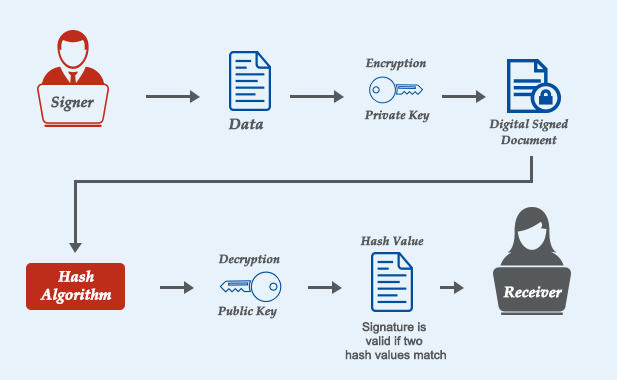
Addresses privacy concerns: In the eSign process, only the thumbprint (hash) of the document is required to be submitted for the signature function rather than providing the whole document as done in paperwork tasks. .

Facilitates legalized signatures: The process of eSign includes signer consent, request to issue eSignature Certificate, eSignature creation and affixing as well as eSignature Certificate acceptance as per the provisions of Information Technology Act. A complete audit trail in electronic form, created to ensure that the transactions are legalized, is also well-maintained.

Secure online service: The eSignature service is based on the e-authentication guidelines. The eSign authentication is carried out using e-KYC services, and on the other hand, the signature on the document is processed on a backend server of the eSign service provider. There are authorized third-party service providers who facilitate eSign services. At present, Certifying Authorities (CA) under the Information Technology Act has the authority to facilitate eSign. To enhance authenticity and security, the private keys for eSign user is built on Hardware Security Module (HSM) and is destroyed straightaway after one-time use.

error: Content is protected !!