
Skip to content
+91 888-391-2222Licensed Certifying Authority
Facebook page opens in new windowX page opens in new windowLinkedin page opens in new windowBlogger page opens in new window
Get Digital Signature Certificate Class 3 Sign, Combo or Renew DSC Online
We Are One of The Best Online Digital Signature Certificate Provider Class 2, Class 3, DGFT & Renew DSC. Buy Digital Signature Online Quickly and Easily from Make My Digital Signature.
Get Digital Signature Certificate Class 3 Sign, Combo or Renew DSC OnlineGet Digital Signature Certificate Class 3 Sign, Combo or Renew DSC Online

Get Digital Signature Online. Call us 24x7 !
+91 888 391 2222, 888 391 3333

  • Home
  • Class 3 Digital Signature
  • DGFT Digital Signature
  • Renew DSC
  • Our Services
    • Digital Signature Certificate for e Tendering
    • Digital Signature Certificate for GST Return Filing
    • Digital Signature Certificate for Income Tax
    • Digital Signature Certificate for Employee Provident Fund
    • Digital Signature Certificate For MCA (ROC)
    • Digital Signature Certificate for ICEGATE
    • Digital Signature Certificate for E-ticketing
    • Digital Signature Certificate for Trademark Registration
  • APPLY DSC ONLINE
    • APPLY INDIVIDUAL CERTIFICATE
    • APPLY ORGANIZATION CERTIFICATE
  • Contact
Search:
Search
  • Home
  • Class 3 Digital Signature
  • DGFT Digital Signature
  • Renew DSC
  • Our Services
    • Digital Signature Certificate for e Tendering
    • Digital Signature Certificate for GST Return Filing
    • Digital Signature Certificate for Income Tax
    • Digital Signature Certificate for Employee Provident Fund
    • Digital Signature Certificate For MCA (ROC)
    • Digital Signature Certificate for ICEGATE
    • Digital Signature Certificate for E-ticketing
    • Digital Signature Certificate for Trademark Registration
  • APPLY DSC ONLINE
    • APPLY INDIVIDUAL CERTIFICATE
    • APPLY ORGANIZATION CERTIFICATE
  • Contact

All about the working system of digital signatures

You are here:
  1. Home
  2. Technology
  3. All about the working system…
Oct232020
TechnologyDigital Signature

Issued only by a Certified Authority, a Digital Signature Certificate (DSC) is a digital key that authorizes the identity of businesses and individuals holding the certificate. To get the DSC, there is a necessity to submit a duly-filled digital signature form. The digital signature certificate comprises information such as the name of the user, email address, country, the date on which the certificate was issued and the name of the certifying authority’s name. The authorization of the digital key takes place to assure the security and authenticity of documents filed online.

It is being observed that data tampering and forgery have been rapidly increasing in the businesses that revolve around manual paperwork. Due to the increase in the loss of important data, it has become a necessity to secure any data shared online and this lays emphasis on the use of Digital Signatures. The ability to authenticate a file, document or software has brought Digital Signatures into the limelight.

Paperwork replaced with Digital Signatures brings in a lot of benefits such as speed up document delivery, lessens operating costs and saves time & efforts.

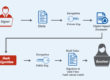
Let’s take a look at how does Digital Signatures Work?

  1. On clicking sign, individuals create a unique digital fingerprint (known as hash) of the document through the use of the mathematical algorithm. The hash is precisely for this particular document; even the minor change made would serve a different hash as an outcome.
  2. On clicking sign, individuals create a unique digital fingerprint (known as hash) of the document through the use of the mathematical algorithm. The hash is precisely for this particular document; even the minor change made would serve a different hash as an outcome.
  3. On clicking sign, individuals create a unique digital fingerprint (known as hash) of the document through the use of the mathematical algorithm. The hash is precisely for this particular document; even the minor change made would serve a different hash as an outcome.

On verifying the Signature:

  1. When the document is opened in a digital signature-capable program like Microsoft Office, Adobe Reader, etc., the signer’s public key (already included in the digital signature) gets automatically used by the program for decryption of the document hash.
  2. For the document, a new hash is calculated through the program. If the new hash created gets matched with the decrypted hash from Step 1, it states that there is no alteration in the document and also displays the message ” No modification has been made since the signature was applied “.

The public key used in the signature is validated by the program to ensure that it belongs to the signer and displays the name of the signer.

Category: TechnologyBy Make My Digital SignatureOctober 23, 2020Leave a comment

Author: Make My Digital Signature

https://www.makemydigitalsignature.com

Post navigation

PreviousPrevious post:The Complete Guide of Digital Signature For GSTNextNext post:What Type of DSC Required for e-Tendering

Related posts

Kockové Hry v Klastrách – Veľké Možnosti pri Stonvegas
October 12, 2026
Zarządzanie Symulowanymi Otożymiami w Automatach do Loterii – Rozważania nad Graą PlayBoom
October 12, 2026
LAkibawin : Stratégies de Gain et Perte au Casino
October 12, 2026
Spintaanbod van de Grote Winstmaker in het Casino Spinita
October 12, 2026
Vavada online kaszinó kezdőknek – alapvető tudnivalók
October 12, 2026
Arkada онлайн казино – мобильная версия сайта и доступ через приложение
October 12, 2026

Leave a Reply Cancel reply

Your email address will not be published. Required fields are marked *

Post comment

Recent Posts
  • Kockové Hry v Klastrách – Veľké Možnosti pri Stonvegas
  • Zarządzanie Symulowanymi Otożymiami w Automatach do Loterii – Rozważania nad Graą PlayBoom
  • LAkibawin : Stratégies de Gain et Perte au Casino
  • Spintaanbod van de Grote Winstmaker in het Casino Spinita
  • Vavada online kaszinó kezdőknek – alapvető tudnivalók
Recent Comments
  • Perfect Filing on What are the different classes of Digital Signature Certificates?
  • core java interview questions on How to register a Digital Signature Certificate under GST Portal in India.
  • Small Business Accountant West Auckland on How to Register the DSC on E-filing website?
  • Lunding Duke on What is The Difference Between Encryption and Signing
  • harish rajendran on What are the different classes of Digital Signature Certificates?
Archives
  • October 2026
  • September 2026
  • August 2026
  • January 2024
  • November 2020
  • October 2020
  • June 2019
Categories
  • Betify Casino
  • casino
  • Casino Lizaro
  • Casino Rivo
  • Donbet Casino
  • Fatbet Casino
  • Fortunica Casino
  • games
  • Lizaro Casino
  • Love Casino
  • Magic Win Casino
  • Mystake Casino
  • Ninewin
  • Ninewin Casino
  • Patrick Spins Casino
  • Patrickspins
  • Post
  • Savaspin
  • Spinboss
  • Spinboss Casino
  • Spins
  • Technology
  • Travel & Leisure, Destinations
  • Vegas Hero
  • Vegashero
  • Vegashero Casino
  • Vegasino Casino
  • Very Well Casino
  • Verywell Casino Uk
  • Winnita
  • Winnita Casino
Meta
  • Register
  • Log in
  • Entries feed
  • Comments feed
  • WordPress.org

Get Digital Signature Certificate Class 3 Sign, Combo or Renew DSC Online is proudly powered by WordPress

error: Content is protected !!

Chat With WhatsApp